Beta · for owners with recurring web tasks
A digital worker for one recurring browser task
Repeatedly transferring data into a web form without a suitable integration? Start with a pilot: demonstrate the action and approve every write.
Module activation is included; AI calls use a separate balance, with no fixed price per skill.
Beta. Setup, a Chrome extension and your participation are required.
Beta. Catalog examples are local demonstrations, not ready workers for arbitrary external systems.
- Your Chrome and logged-in session
- Training for a specific sequence
- Reports and pauses for human decisions
Three pilot conditions
A pilot fits when
- Limited rights: the worker sees and changes only the data the task needs
- A reversible action: a mistake can be corrected without harm
- An accountable reviewer: a person approves writes and reads the report
Not for a pilot
- Bypassing login, CAPTCHA or site restrictions
- An irreversible action without human approval
- A task with a standard integration or API — evaluate that first
- pilot scope
- One task
- train the steps
- Show
- before use
- Check
- what happened
- Report
What the owner controls
Choose the task
- Recurring fields and a defined result
- Authorized access
- Check standard integrations first
Control writes
- Confirm specific facts
- Recheck before writing
- Changed facts need a new decision
What you need to start
A responsible person
Someone who knows and can verify the operation.
A safe test form
Use permitted access and nonproduction data.
Chrome and a session
You sign in and handle login prompts.
Time and budget
Measure manual work, setup, corrections and AI usage.
Your first workflow
- 1
Connect the workspace
Enable Digital worker in the extension store, accept the terms, create a worker and pair Chrome with a one-time code.
- 2
Demonstrate one permitted action
Record your own test form workflow and review the draft before execution.
- 3
Test in stages
Start without writes, then work together, then run attended. Review and accept the tested workflow before use.
Try your own example
Product steps, not testimonials or promised results.
Worker card
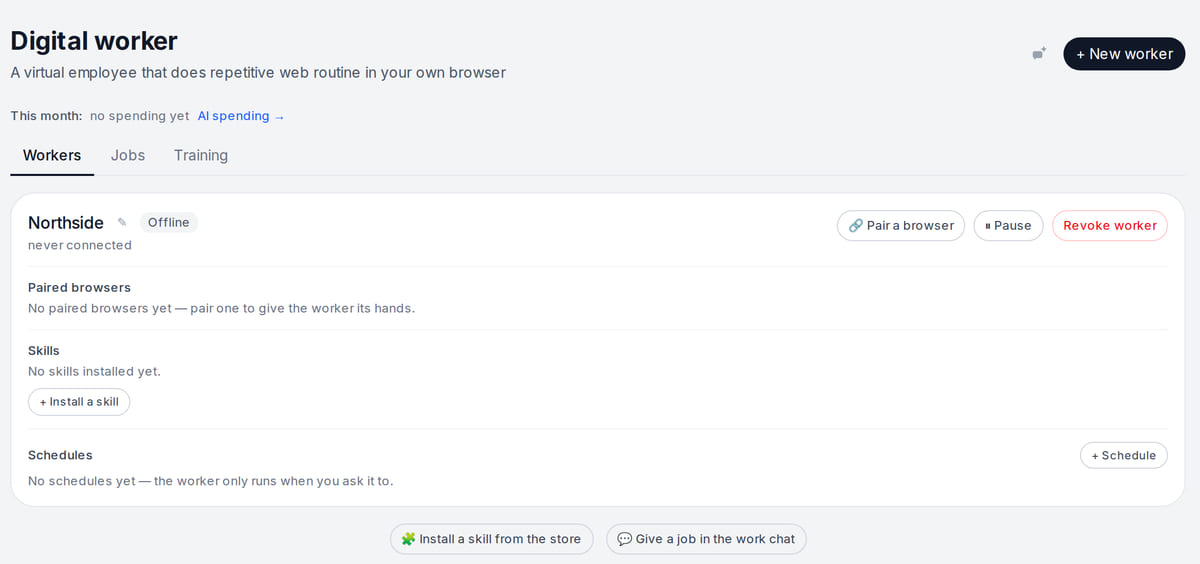
Real screen, test data, 3 October 2026. The worker runs only in a browser you paired and when you tell it to What a skill can do
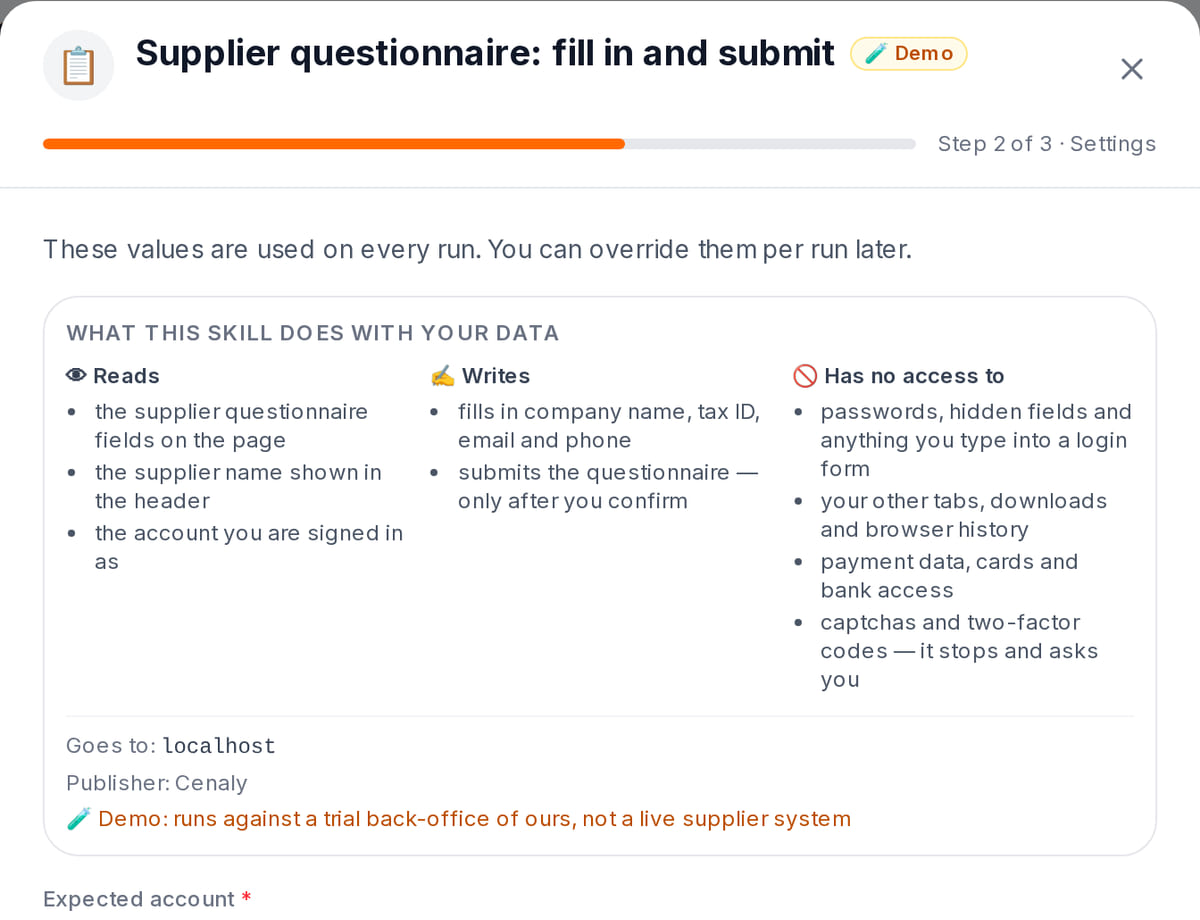
Real screen, test data, 3 October 2026. Before installing you see what the skill reads and writes; submitting needs your confirmation


Pilot sequence: input, approval, result, stop
Real local engine tests cover replay, expiry and changed facts, not compatibility with every site.
- 1
Input: facts on screen
The worker shows three approved requests and waits for a person. Nothing is written before that.
Write controls → - 2
Action only with approval
Confirmation is one-time and time-limited. The engine rereads the data before writing.
Pilot workflow → - 3
A verifiable result
In the test the recheck finds a fourth request: writing stops under the old approval and the change is reported.
Changed facts → - 4
Stop until a fresh decision
Repeated or expired approval cannot authorize the action.
Pilot workflow →
How it works in practice

Illustration; the screen shows the real interface, test data, 3 October 2026. Review the scenario first, then run a pilot

Where it helps the owner
A recurring questionnaire
Example: test your form before deciding whether training fits.
A changed page
Example: reviewing a moved button takes time; include it in your cost.
An available integration
Example: prefer evaluating the standard API path first.
Example situations. Measure time and costs with your own operations.
Measure one verified workflow first
Measure one verified workflow first
Module activation is currently included. AI calls use a separate balance; no fixed skill-execution price is established.
Pilot costs
- Training, task analysis and AI exceptions use a separate balance
- Inspect AI usage; no universal per-employee price is offered
- External services and workstations are separate
- Include setup and corrections when comparing manual time
Before paid analysis
Choose one recurring operation and check for a suitable standard integration first.
Prepare a one-task pilotBeta. Setup, a Chrome extension and your participation are required.
What to consider before you start
- Beta with local catalog demonstrations; your own form needs training and testing.
- Only permitted actions and data. Login, CAPTCHA and site restrictions are not bypassed.
- Unattended use depends on workflow and risk, not every action.
- Form changes, expired sessions or exhausted AI balance may pause work.
Test your workflow and required connections before migrating data.
Frequently asked questions
Is this a ready replacement for an employee?
No. It is a beta pilot for one tested operation with owner setup and review.
Is my system supported out of the box?
There is no broad catalog. The platform examples are local; assess your form separately.
How should I start?
Use your own test form and no-write mode, then human-guided and attended tests.
Details for every screen are in the help centre. Where to start →
Related workflows
All solutions →Define one operation and a successful pilot
Record inputs, destination, reviewer and current manual time before setup.
Beta. Setup, a Chrome extension and your participation are required.